
AI
IKSir in HieraChart
Add IKSir to HieraChart: ask your chart and see the answer in the chart.
“How many open positions are there in Sales?” Today, answering that means setting filters, browsing the chart and adding up numbers by hand.
With IKSir in HieraChart you type the question: the answer arrives in seconds and opens in the chart with one click. In restructuring you describe the change in one sentence; IKSir prepares the proposal and you approve.
 IKSir
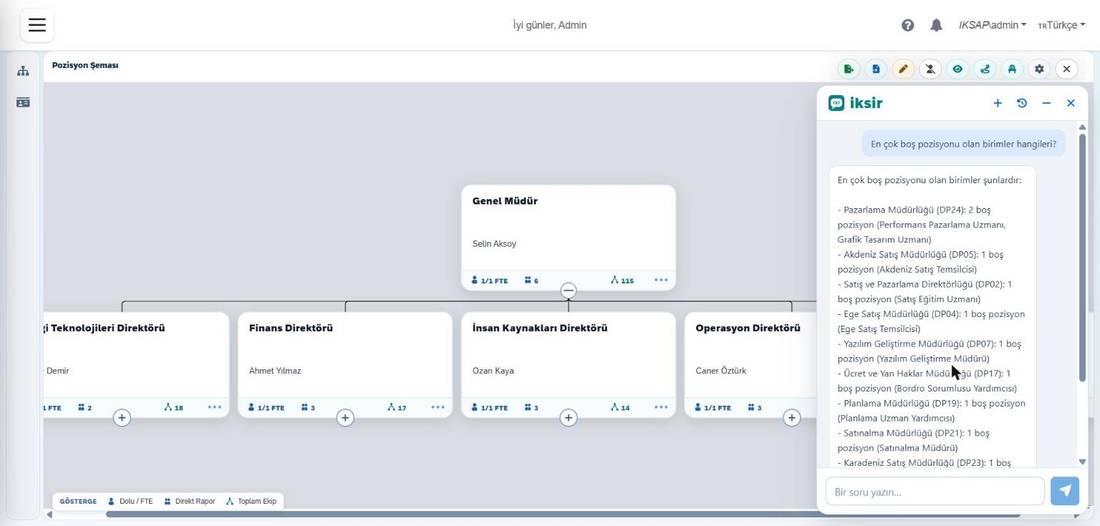
User: Which units have the most open positions?
IKSir: The Marketing Directorate has the most open positions: 2. It is followed by the Mediterranean and Aegean Sales Directorates with one each. In total there are 10 open positions across 9 departments.
User: Add a ‘Social Media Specialist’ position to the Marketing Directorate.
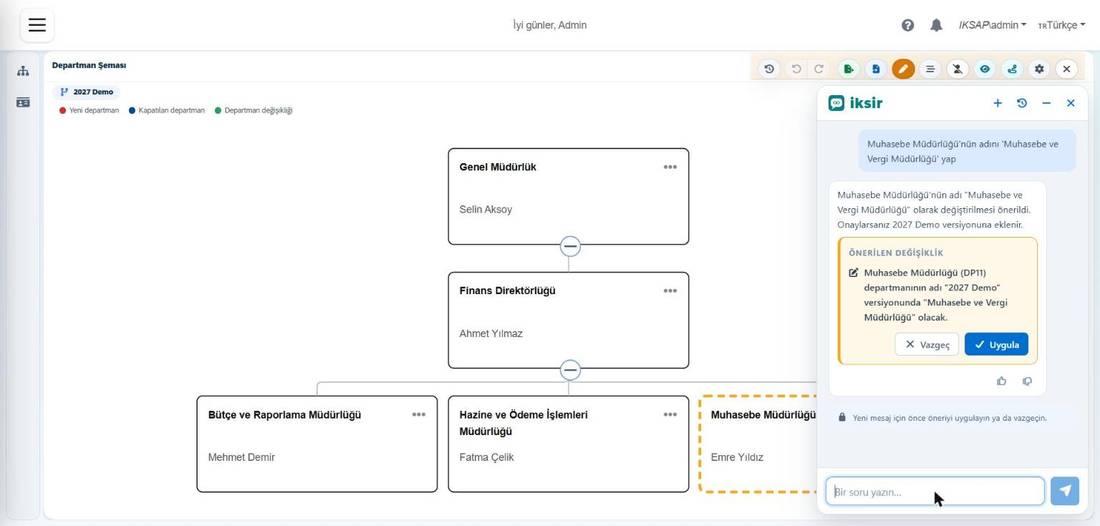
IKSir: Proposal ready: 1 new position in the Marketing Directorate. If you approve, it is added only to the draft version; the live chart does not change.
What changes with IKSir?
Before
- Filters and chart browsing for a single number
- Restructuring drafts are built box by box by hand
- Managers wait for a report from HR
With IKSir
- Type the question; the answer arrives in seconds and opens in the chart
- Describe the change in one sentence; the proposal card comes ready
- Managers ask their own questions
Who benefits and how?
HR specialist
Sees open positions and headcount status with one question, without setting filters.
Unit manager
Asks about their own team without learning HieraChart: how many people, how many open positions.
Senior management
Assesses the structure in a few questions with indicators such as span of control and reporting depth.
Restructuring team
Builds a scenario in the draft with one sentence; no risk to the live structure, undone in one step.
IT
No new access is opened: everyone sees only what HieraChart permits. Names are pseudonymized; nothing is written to the live chart.
What can you ask your chart?
| Topic | Example question |
|---|---|
| Overall figures | “How many employees do we have?” · “How many departments are there, and how many open positions in total?” |
| People and positions | “Who manages the Sales department?” · “Who holds this position?” |
| Reporting line | “Show this person's management chain up to the General Manager.” |
| Open positions | “Which 3 departments have the most open positions?” |
| Structure analysis | “What is the average span of control?” · “How many levels is the deepest reporting line?” |
| Budget and level | “Are there off-budget positions under this unit?” · “Show Sales as manager and above.” |
You can follow up on the previous answer (“And their manager?”). Where relevant, a button opens the result in the chart with one click; long lists open on screen and can be exported, and a unit's chart can be downloaded as an image.
Restructuring: IKSir proposes, you approve
| Action | Example command |
|---|---|
| Close a position | “Close the Graphic Design Specialist position.” |
| Move | “Move the Sales Specialist position under the Marketing Manager.” |
| Bulk move | “Move all positions in the Aegean Sales Directorate to the Mediterranean Sales Directorate.” |
| Add positions and units | “Add a ‘Social Media Specialist’ position to the Marketing Directorate.” |
| Rename, merge, split | “Merge department A with B.” |
- 1
Open a version
You open a draft version in edit mode; IKSir works on the open version.
- 2
Describe it
You describe the change in one sentence.
- 3
Check the card
IKSir shows a proposal card and marks the affected boxes in the chart; you remove any line you do not want.
- 4
Apply
The change is written only with “Apply” and undone with a single “Undo”; the change history marks it as “via AI.”
The live org chart does not change during this process: it updates only with the actual change in SAP or SuccessFactors and the next sync.
You stay in control
Permissions.
Everyone queries only the records they are permitted to see in HieraChart; IKSir opens no new access.
Personal data.
Names go to the AI as pseudonyms. Email, phone, employee ID, hire date and seniority are never sent; pay, health and union data cannot be enabled by any setting.
Live data is protected.
IKSir never writes to the live chart, SAP or SuccessFactors.
Language model.
An in-house or a global large language model (LLM) can be used; because counts run inside HieraChart, no raw employee list reaches the model.
Details: AI Trust and Compliance →
Frequently Asked Questions
Can IKSir give a wrong answer?
Yes; IKSir is an AI assistant and may sometimes give a wrong or incomplete answer. Check the answer with “Show in chart” before deciding; changes are in any case written only with your approval and only to a draft version.
What can IKSir do in HieraChart?
It answers org chart questions in plain language, opens the result in the chart, prepares an image of a unit's chart and writes restructuring changes to a draft version with your approval.
Does IKSir's proposal reach the live chart?
No. Proposals are written only to the draft version; the live chart changes with the actual change in SAP or SuccessFactors and the next sync.
Does IKSir send personal data to the AI?
Email, phone, employee ID, hire date and seniority are never sent; names go as pseudonyms and counts run inside HieraChart.
See IKSir in HieraChart with your own org chart.
Ask IKSir questions about your organization in a short demo.